

Logging
Search, export, and keep a history of every agent’s logs — with configurable storage, retention, and deletion controls.Nora saves every running agent’s container output (stdout/stderr — startup output, crashes, stack traces, OOM kills) so you can search and export it later, even after the agent has restarted or the live log viewer is closed. OpenClaw agents also send structured gateway logs. Logs are compressed, encrypted, and stored in the destination you configure. Log collection is on by default after setup — there’s nothing to configure before you can use it.
View an agent’s logs
1
Open Logging
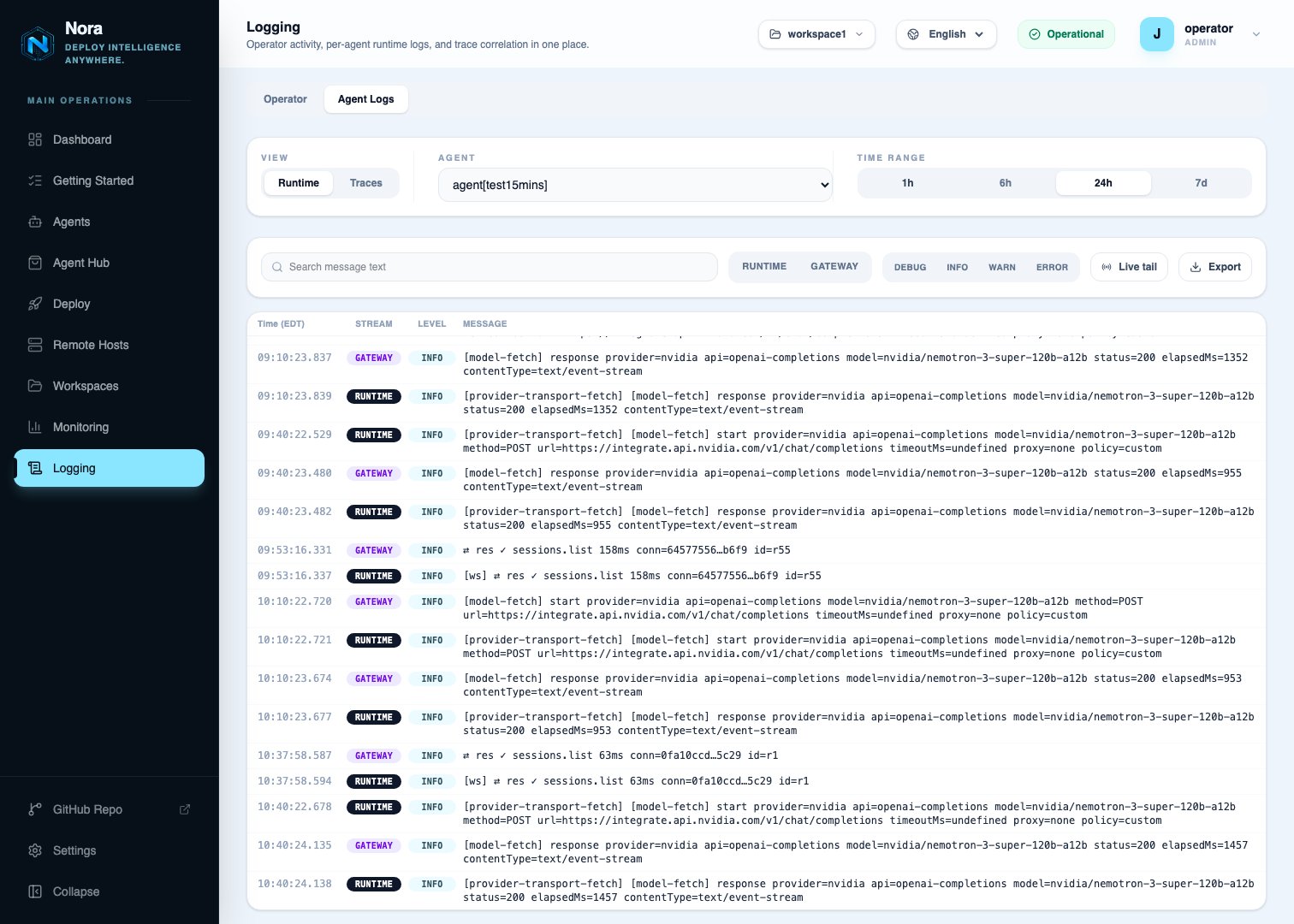
Click Logging in the dashboard sidebar and switch to the Agent Logs tab. (The
Operator tab is your account’s activity log — see
Monitoring.)
2
Pick an agent and time range
Keep the Runtime view, choose the agent, and choose a time range: 1h, 6h, 24h,
or 7d.
3
Filter
Search the message text, and narrow by stream or level (Debug, Info, Warn,
Error). Turn on Live tail to follow new lines as they arrive.
4
Export
Click Export to download the lines matching your current filters and time range as an
NDJSON file.
New lines show up in search right away. They’re written to storage in batches about every 15 minutes.
What’s supported
¹ Tracing needs a newer OpenClaw than Nora currently deploys — see Traces.
Container logs work on Docker, Kubernetes, and Remote Docker (an experimental deploy target). Kubernetes requires
s3 or r2 storage — see Storage destinations.
Proxmox LXC logging is best effort, like Proxmox support in general (see
Proxmox). Logs are collected, but after a
reconnect or worker restart some lines may be stored twice or missed, and each line is timestamped
when Nora receives it rather than when the agent wrote it.
Delete logs
Logs are deleted automatically when they pass the retention period. You can also delete them yourself.Delete a time range
To free up space, delete one agent’s logs for a time range. This is available through the API only — there’s no button for it in the dashboard:When you delete an agent or workspace
Deleting an agent (from its Settings tab) or a workspace asks whether to Keep logs or Delete logs. There’s no default — you have to pick one.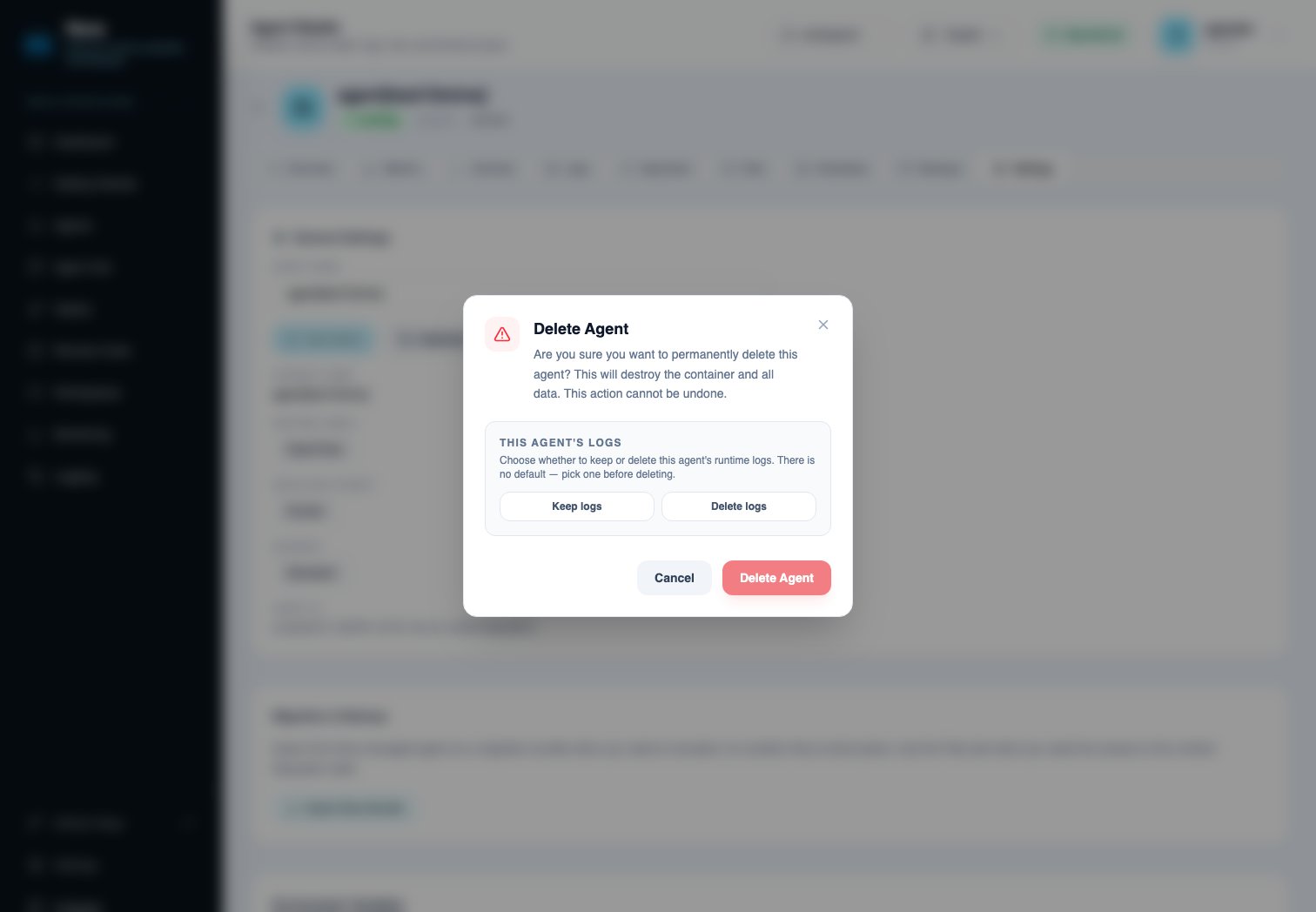
deleteLogs field is required:
Recover kept logs
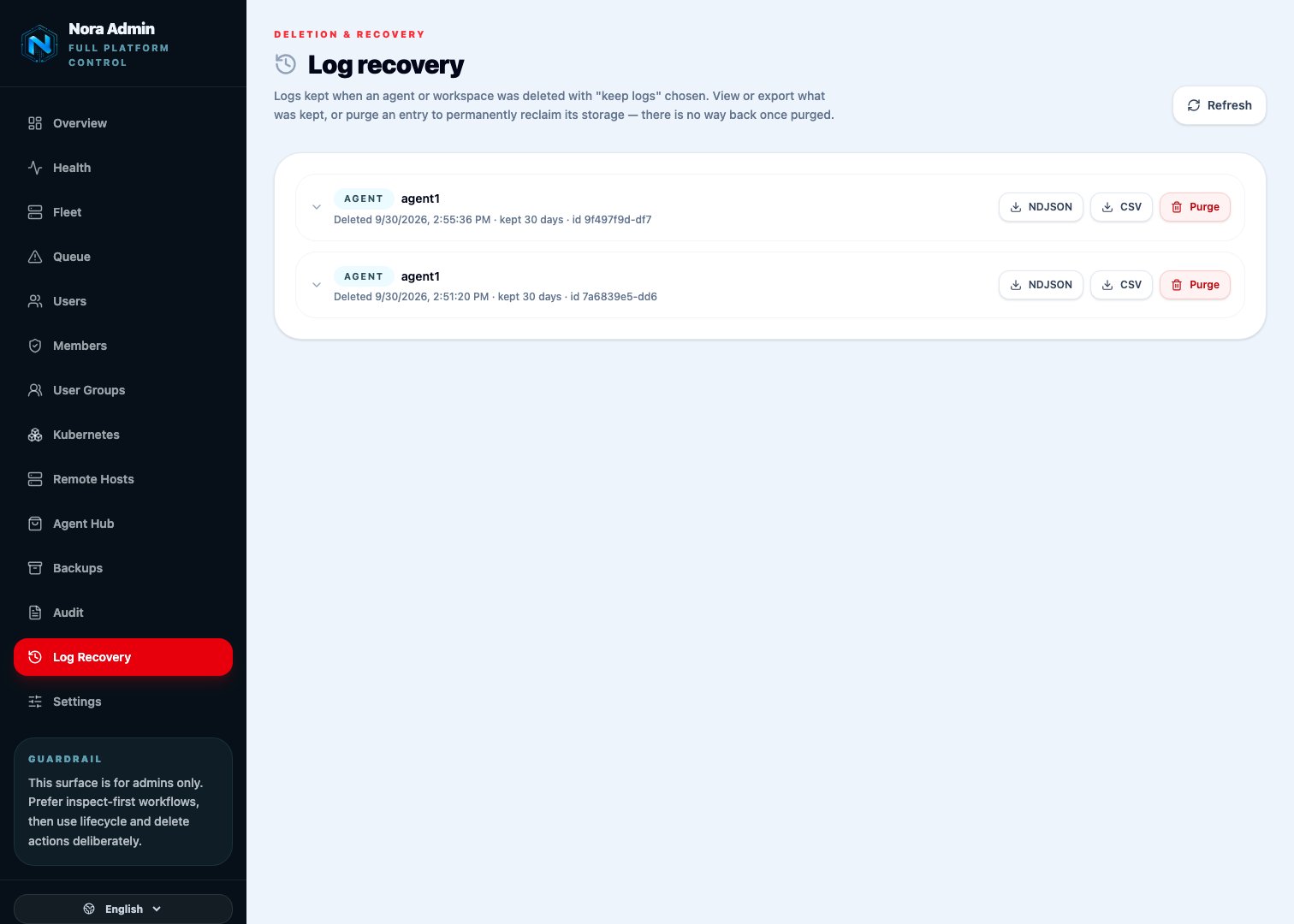
Kept logs no longer appear on the Logging page. Platform admins can find them on the Log Recovery page in the admin dashboard (/admin/log-recovery). Expand an entry to preview it, download it as NDJSON or CSV, or Purge it to free the space. Kept logs still expire on the retention period that applied when the agent was deleted.
Permissions
API keys need the
logs:read scope to search and export, and only reach agents in the workspace the key belongs to.
Turn log collection on or off
The rest of this guide covers setup and is mostly for platform admins. Collecting logs means Nora stores what your agents print, so it’s off until you turn it on. Nothing is collected after an upgrade unless someone chooses it.- Fresh install:
setup.sh/setup.ps1ask whether to enable log collection, how many days to keep logs, and how much disk thelocaldestination may use. - Upgrade with
setup.sh --updateorsetup.ps1: it asks the same three questions once, on a terminal, if no choice has been made yet. Pressing Enter means no. - One-click upgrade from the dashboard: it can’t ask, so collection stays off. A banner in the admin dashboard says so until someone decides.
.env (NORA_LOG_ENABLED=true or false, then restart worker-provisioner); once someone changes it in the dashboard, the dashboard setting wins and .env is ignored.
Turning collection on is refused if logs couldn’t be saved (an unusable NORA_LOG_ENCRYPTION_KEY), or if you use local storage while Kubernetes is an enabled deploy target — pick S3, R2 or SSH storage first.
When you turn collection off
If logs have already been collected, you’re asked what to do with them. There’s no default:- Keep existing logs — they stay searchable and expire on the normal retention schedule.
- Delete all logs — every agent’s collected logs are removed permanently, in the background. This can’t be undone, and backups don’t contain them. Logs kept for agents or workspaces you already deleted aren’t touched; they have their own purge on the Log Recovery page.
PUT /api/admin/log-collection takes { "enabled": false, "deleteExisting": true | false }, and deleteExisting is required when logs exist. You can’t turn collection back on while a delete is still running.
Collection is a platform-wide setting: it’s on or off for every agent, and covers both container and gateway logs. Workspaces can’t switch it off — they only choose how long their logs are kept (see Retention).
Storage destinations
NORA_LOG_STORAGE selects where logs go. It’s the same set of destinations as managed backups:
See the environment variable reference for the full list.
Logs are stored under a
logs/ folder, so you can safely point logs and backups at the same bucket or SSH path.
local logs are not included in Nora backups. If you lose the server, run
docker compose down -v, or restore a backup onto a new server, local logs are gone. Use s3,
r2, or ssh if logs need to survive losing the host.Kubernetes installs must use object storage (
s3 or r2). The Helm chart refuses to install
with the local destination, and Nora rejects switching to local while Kubernetes is enabled.
The chart also requires a single worker-provisioner replica.Change the destination
The env values only set the initial destination. After that, platform admins change it in the admin dashboard under Settings → Log Storage.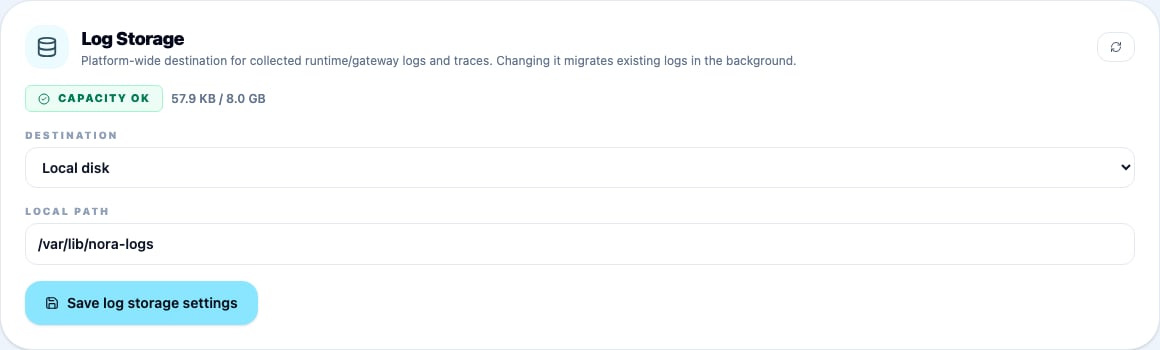
local to s3), existing logs are copied over in the background — check progress with GET /api/admin/log-storage/migration. Only one migration can run at a time.
keepSourceCopies decides what happens to the old copies:
false— old copies are deleted once they’ve been copied over.true— old copies are kept until they expire under normal retention. Keep the old destination’s credentials configured until then.
Retention
Logs and traces are deleted automatically once they’re older than the retention period.
A workspace can choose a shorter period than the platform ceiling, but never a longer one. In PaaS mode the ceiling comes from the subscription plan — see Platform modes.
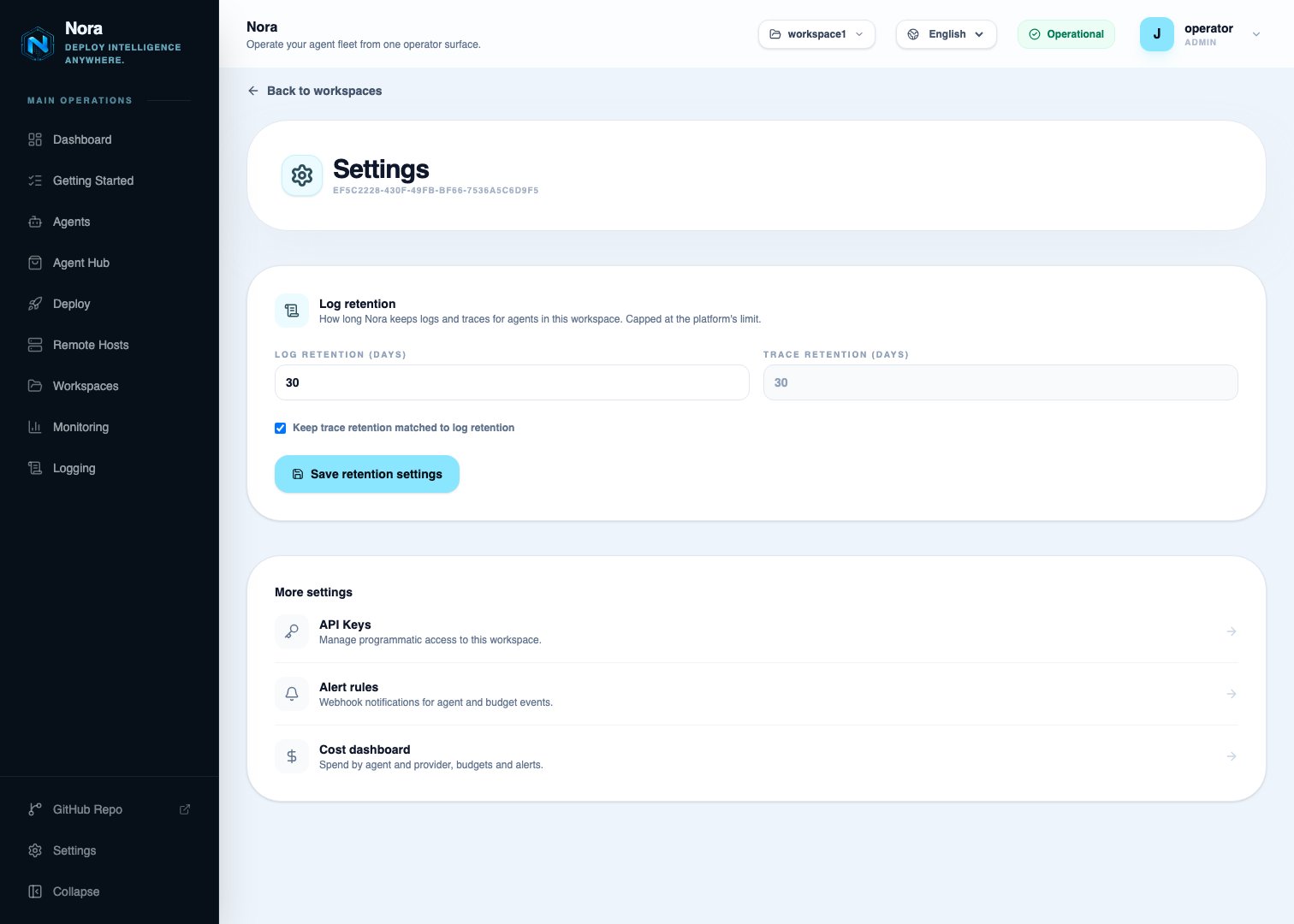
Disk limit for local storage
NORA_LOG_LOCAL_MAX_BYTES caps how much disk local logs can use across the whole installation, so logs don’t fill the host’s disk and take Nora down with it. Setup sets the cap to the smaller of 10 GB or 20% of free disk, leaving the rest of the disk for Nora itself.
The Log Storage card in admin settings shows current usage against the cap, with a status badge:
Collection resumes automatically once you raise the cap or delete logs.
Gateway logs and traces (OpenClaw)
Gateway logs
For OpenClaw agents, Nora also collects structured logs from the agent’s gateway. These appear alongside container logs in the Runtime view, under the Gateway stream. Nora redacts secrets from gateway logs before storing them.Traces
Traces show each model call and tool call an agent makes, with duration, token counts, and cost.Traces aren’t available yet. They rely on an OpenClaw plugin that needs OpenClaw 2026.9.3 or
later, and Nora currently deploys 2026.6.11. Turning tracing on today is safe but has no effect,
so leave it off until a Nora release moves to a supported OpenClaw version. No action needed;
please don’t run
openclaw update inside an agent to get there sooner, as it can break the agent.NORA_TRACES_ENABLED=true in .env and restart backend-api.
Running agents pick up the change within about 30 seconds, without restarting. Nora installs the OpenClaw tracing plugin automatically and the Traces view shows whether it loaded for each agent.
Agents send traces to Nora, so they need to be able to reach it. For agents on Kubernetes, Remote Docker, or Proxmox, set NORA_OTLP_PUBLIC_ENDPOINT to an address of Nora those hosts can reach (for example https://nora.example.com/api).
Select a trace to see its span waterfall, with log lines from the same agent and time window shown underneath.
Prompt and tool-output content is never captured in traces, and every request is traced (no
sampling), so cost totals reflect real spend.
Encryption key rotation
NORA_LOG_ENCRYPTION_KEY accepts multiple comma-separated keyId:hexkey pairs. The first one is used for new logs; the rest are kept for reading older logs.
1
Add a new key
Put the new pair first, for example
k2:<new-hex>,k1:<old-hex>.2
Restart services
Restart
worker-provisioner and backend-api.3
Remove the old key once its logs expire
When no logs encrypted with the old key remain (they’ve aged out under retention), remove the old pair.
Search and export through the API
Search and export work on one agent at a time:streams, levels, q). Export returns NDJSON (default) or CSV and requires a from / to range.
Troubleshooting
No logs are being saved
No logs are being saved
Collection is off until someone turns it on — check Settings → Log Collection in the admin
dashboard (or
NORA_LOG_ENABLED=true in .env). Then check that NORA_LOG_ENCRYPTION_KEY is
set and restart worker-provisioner.Collection stopped for every agent
Collection stopped for every agent
On
local storage, the disk cap (NORA_LOG_LOCAL_MAX_BYTES) has been reached — the Log Storage
card in admin settings shows Capacity halted. Raise the cap or delete logs; collection
resumes on its own within about 30 seconds.Gateway logs paused for an agent
Gateway logs paused for an agent
If the connection to an agent’s gateway drops silently, Nora detects it and reconnects within
about a minute.
Traces view says tracing is not enabled
Traces view says tracing is not enabled
Tracing is off for the installation, which is the default. A platform admin turns it on with
NORA_TRACES_ENABLED=true — but see the next entry first.Traces view says tracing is unsupported
Traces view says tracing is unsupported
Expected today: the OpenClaw version Nora deploys (2026.6.11) is older than the tracing plugin
requires (2026.9.3). There’s no supported way to upgrade an agent’s OpenClaw yet — don’t run
openclaw update manually. Traces will work once Nora ships a supported version.Live log viewer and stored logs look slightly different
Live log viewer and stored logs look slightly different
The live viewer on the agent page reads the container separately from the collector, so
formatting can differ slightly. The content is the same.