> ## Documentation Index
> Fetch the complete documentation index at: https://docs.norafleet.ai/llms.txt
> Use this file to discover all available pages before exploring further.
# Backups
# Managed agent backups
> Snapshot an agent's persistent state on demand or on a schedule, store the encrypted archive locally or in S3 / R2 / SSH, and restore from any backup into a new agent.
Nora's managed-backup tier captures an agent's container state — files, integrations, and runtime data — into an encrypted archive and stores it in the destination you configure. Backups run as BullMQ jobs in a dedicated worker so deploys aren't impacted. Restores create a new agent from the archive (in-place restore is admin-only and not exposed via the public API).
## Storage destinations
`NORA_BACKUP_STORAGE` selects where archives go. Supported values:
| Destination | Configuration |
| ----------- | ----------------------------------------------------------------------------- |
| `local` | Default. Archives live in the `nora_backups` Docker volume. |
| `s3` | AWS S3 or any S3-compatible service. Set `NORA_BACKUP_S3_*` env vars. |
| `r2` | Cloudflare R2. Set `NORA_BACKUP_R2_*` plus the account-specific endpoint URL. |
| `ssh` | SSH/SFTP upload to a remote host. Set `NORA_BACKUP_SSH_*` env vars. |
Credentials can be set via env at startup or managed at runtime from **Admin Settings → Backups**. See the [environment variable reference](/configuration/environment-variables#managed-backups) for the full list.
`NORA_BACKUP_ENCRYPTION_KEY` must be set before creating the first backup. Archives are sealed
with this key — rotating it makes existing archives unrecoverable.
## Capture an on-demand backup
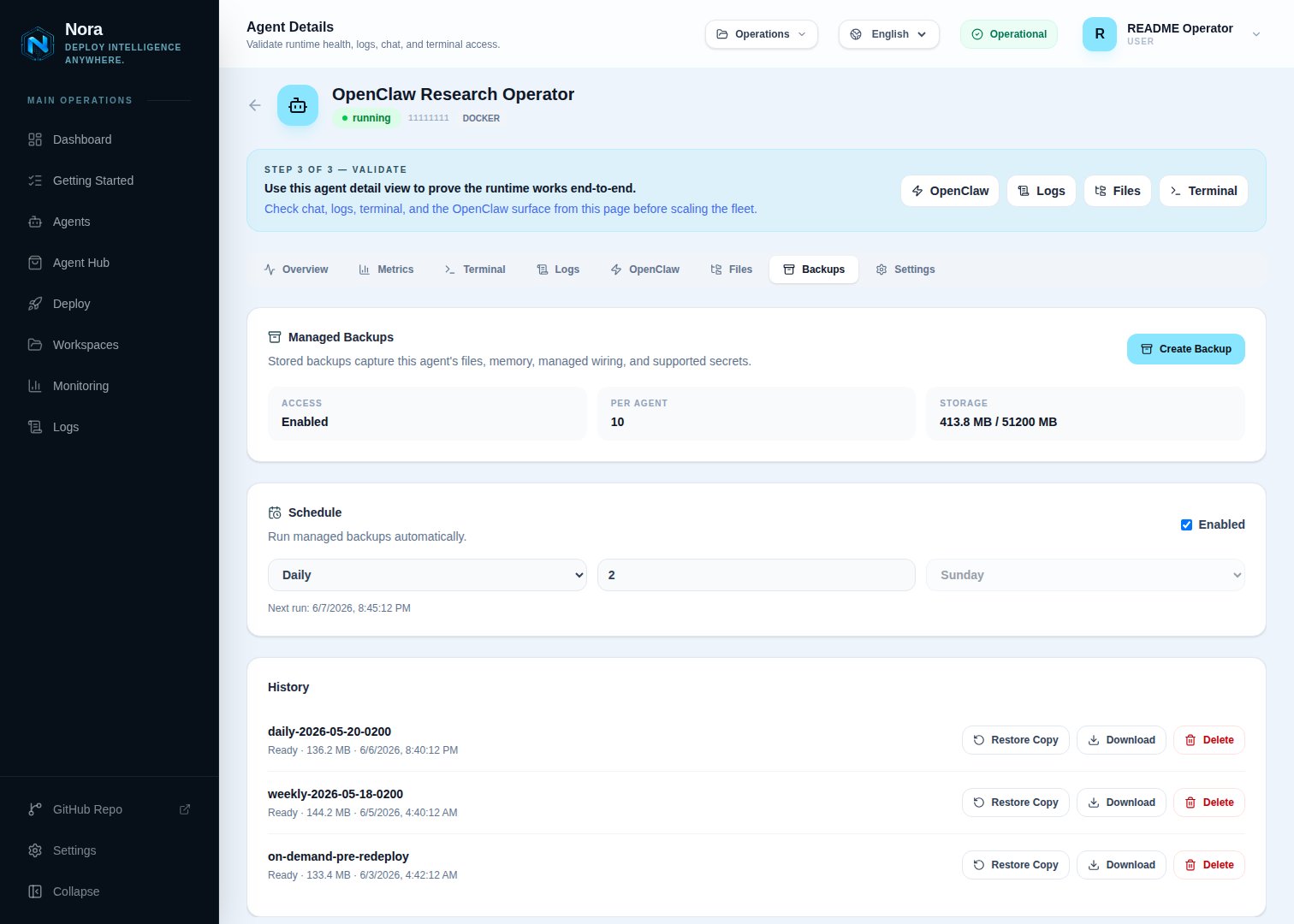 Navigate to the agent you want to back up.
Click **Backups** in the agent's secondary navigation. The panel shows existing backups with their
size, creation time, and status.
Optionally name the backup (defaults to a timestamped label). Confirm. Nora queues a backup job on the `backups` queue and the panel shows it as `queued`. The backup worker (`workers/backup`) picks it up, snapshots the agent state, encrypts the archive, and uploads it to the configured destination.
Backup jobs have a hard `Promise.race` timeout of `NORA_BACKUP_JOB_TIMEOUT_MS` (default 30 minutes). Long-running snapshots are aborted at the timeout — agents holding open large datasets may need a higher value.
The backup transitions through `queued` → `running` → `ready` / `ready_with_warnings` (or `failed`). When complete, the **Download** action becomes available.
Remote Docker capture requires the agent owner's current host grant for the entire live export.
Unsharing the host or losing the qualifying workspace role aborts an in-flight capture instead of
falling back silently to stale stored files. A full-installation backup can still finish as
`ready_with_warnings`, but it omits any revoked Remote Docker agent archive and records that
omission in the installation manifest.
## Schedule recurring backups
Navigate to the agent you want to back up.
Click **Backups** in the agent's secondary navigation. The panel shows existing backups with their
size, creation time, and status.
Optionally name the backup (defaults to a timestamped label). Confirm. Nora queues a backup job on the `backups` queue and the panel shows it as `queued`. The backup worker (`workers/backup`) picks it up, snapshots the agent state, encrypts the archive, and uploads it to the configured destination.
Backup jobs have a hard `Promise.race` timeout of `NORA_BACKUP_JOB_TIMEOUT_MS` (default 30 minutes). Long-running snapshots are aborted at the timeout — agents holding open large datasets may need a higher value.
The backup transitions through `queued` → `running` → `ready` / `ready_with_warnings` (or `failed`). When complete, the **Download** action becomes available.
Remote Docker capture requires the agent owner's current host grant for the entire live export.
Unsharing the host or losing the qualifying workspace role aborts an in-flight capture instead of
falling back silently to stale stored files. A full-installation backup can still finish as
`ready_with_warnings`, but it omits any revoked Remote Docker agent archive and records that
omission in the installation manifest.
## Schedule recurring backups
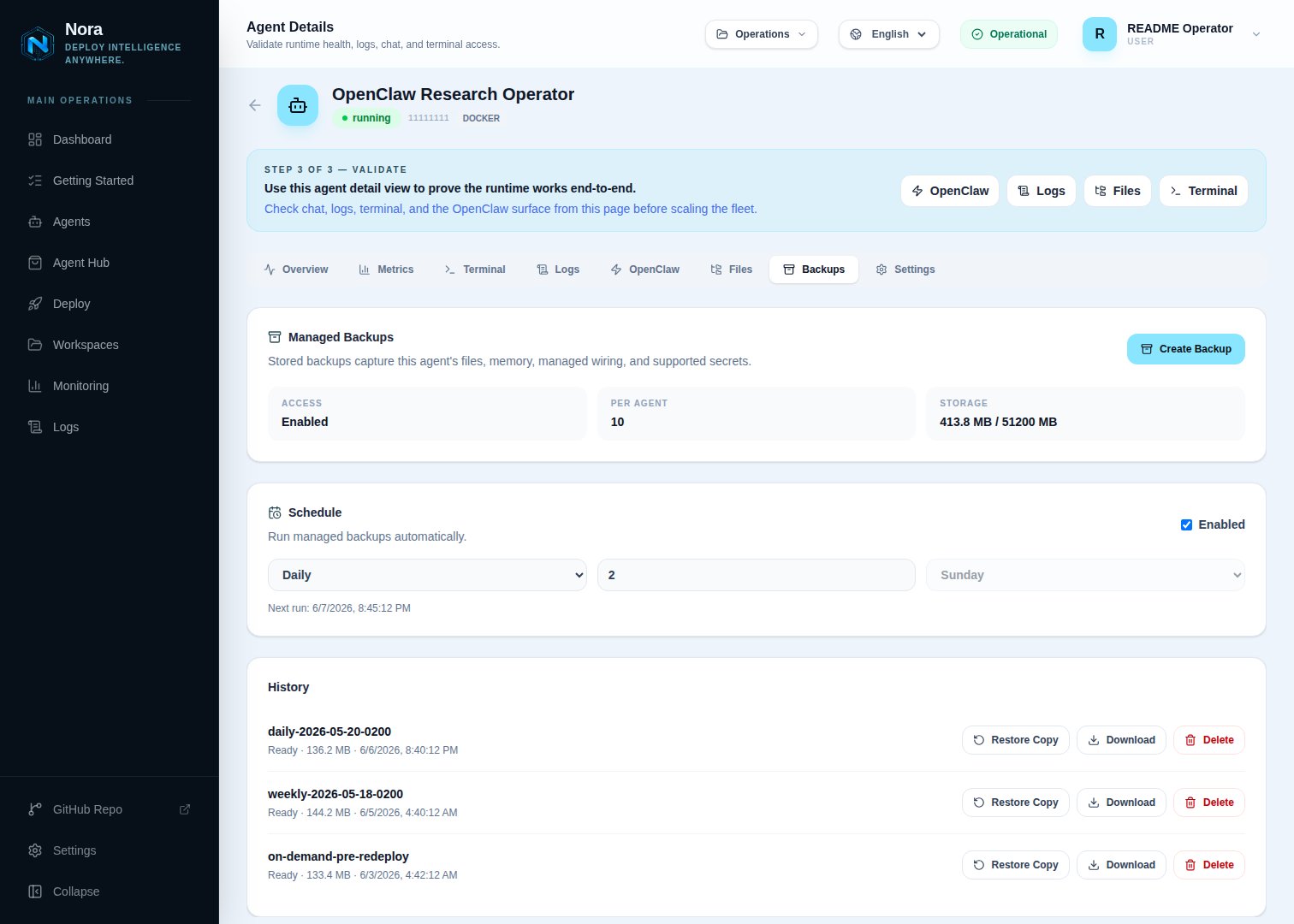 Each agent has its own schedule. From the Backups panel, click **Schedule**:
| Field | Notes |
| --------------- | ------------------------------------------------------------------ |
| **Enabled** | Master toggle for the schedule. |
| **Frequency** | One of `hourly`, `daily`, `weekly`. |
| **Retain** | How many scheduled backups to keep before pruning the oldest. |
| **Next run at** | Computed from the frequency and the most recent successful backup. |
The backup worker polls every `NORA_BACKUP_SCHEDULE_POLL_MS` (default 60 seconds) for due schedules and enqueues a job for each. Manual backups don't count against the scheduled retention.
## Restore from a backup
The public API exposes **copy** restore only — it materializes the backup into a new agent in your workspace, leaving the original agent untouched.
From the agent's Backups panel, click the **Restore** action on any `ready` (or `ready_with_warnings`) backup.
Choose the workspace and an agent name for the restored copy. Click **Create restore draft**.
Nora creates a new agent in `queued` status seeded from the backup's snapshot. The deploy follows the standard agent lifecycle — verify the agent reaches `running`, then point traffic at it.
Admin-only in-place restore is deliberately destructive. Nora cancels stale deployment jobs,
destroys the old runtime while its persisted identity is still available, then clears that identity
before materializing and queueing the replacement. If materialization or queueing fails, the agent
is fenced from provisioning and normally stays `stopped` with no stale container or gateway
identity. If a racing replacement runtime cannot be destroyed safely, Nora leaves the agent in
`warning` with its cleanup identity retained for operator recovery. Fix the cause, reconcile any
warning state, and retry the restore.
## Retention and limits
Two settings cap storage usage:
| Setting | Default | What it bounds |
| ----------------------------- | ------- | ------------------------------------------------------------------------------ |
| `NORA_BACKUP_LIMIT_PER_AGENT` | `10` | Max backups retained per agent. Older entries are pruned automatically. |
| `NORA_BACKUP_STORAGE_MB` | `51200` | Soft cap on total backup storage. Workspace creation is gated on this cap. |
| `NORA_BACKUP_RETENTION_DAYS` | `30` | Days to keep expired/scheduled backups before background pruning removes them. |
PaaS deployments override these per subscription tier. See [Platform modes](/configuration/platform-modes).
## Permissions
| Capability | Required role |
| ----------------------------------- | ---------------------------------------- |
| List backups for an agent | agent owner |
| Create a backup or schedule | agent owner |
| Download an archive | agent owner |
| Delete a backup | agent owner |
| Create a copy-restore draft | agent owner |
| In-place restore (overwrite source) | platform admin only — not via public API |
## Troubleshooting
Check that the `worker-backup` container is running. Its health endpoint is `http://worker-backup:4002/health`. If unhealthy, the BullMQ `backups` queue has nothing draining it.
`NORA_BACKUP_ENCRYPTION_KEY` was rotated. Old archives can't be decrypted with a new key. Roll the
key back temporarily, restore, then re-key. There's no recovery path if both the old key and a
copy of the archive are lost.
Verify the bucket policy allows `s3:PutObject` for the configured access key on the bucket and
prefix Nora is writing to. Cloudflare R2 also requires the account-specific endpoint URL, not the
AWS endpoint.
The SSH destination uses sftp under the hood. Check that the remote user can write to `NORA_BACKUP_SSH_REMOTE_PATH` and that the host is reachable from inside the `worker-backup` container.
Each agent has its own schedule. From the Backups panel, click **Schedule**:
| Field | Notes |
| --------------- | ------------------------------------------------------------------ |
| **Enabled** | Master toggle for the schedule. |
| **Frequency** | One of `hourly`, `daily`, `weekly`. |
| **Retain** | How many scheduled backups to keep before pruning the oldest. |
| **Next run at** | Computed from the frequency and the most recent successful backup. |
The backup worker polls every `NORA_BACKUP_SCHEDULE_POLL_MS` (default 60 seconds) for due schedules and enqueues a job for each. Manual backups don't count against the scheduled retention.
## Restore from a backup
The public API exposes **copy** restore only — it materializes the backup into a new agent in your workspace, leaving the original agent untouched.
From the agent's Backups panel, click the **Restore** action on any `ready` (or `ready_with_warnings`) backup.
Choose the workspace and an agent name for the restored copy. Click **Create restore draft**.
Nora creates a new agent in `queued` status seeded from the backup's snapshot. The deploy follows the standard agent lifecycle — verify the agent reaches `running`, then point traffic at it.
Admin-only in-place restore is deliberately destructive. Nora cancels stale deployment jobs,
destroys the old runtime while its persisted identity is still available, then clears that identity
before materializing and queueing the replacement. If materialization or queueing fails, the agent
is fenced from provisioning and normally stays `stopped` with no stale container or gateway
identity. If a racing replacement runtime cannot be destroyed safely, Nora leaves the agent in
`warning` with its cleanup identity retained for operator recovery. Fix the cause, reconcile any
warning state, and retry the restore.
## Retention and limits
Two settings cap storage usage:
| Setting | Default | What it bounds |
| ----------------------------- | ------- | ------------------------------------------------------------------------------ |
| `NORA_BACKUP_LIMIT_PER_AGENT` | `10` | Max backups retained per agent. Older entries are pruned automatically. |
| `NORA_BACKUP_STORAGE_MB` | `51200` | Soft cap on total backup storage. Workspace creation is gated on this cap. |
| `NORA_BACKUP_RETENTION_DAYS` | `30` | Days to keep expired/scheduled backups before background pruning removes them. |
PaaS deployments override these per subscription tier. See [Platform modes](/configuration/platform-modes).
## Permissions
| Capability | Required role |
| ----------------------------------- | ---------------------------------------- |
| List backups for an agent | agent owner |
| Create a backup or schedule | agent owner |
| Download an archive | agent owner |
| Delete a backup | agent owner |
| Create a copy-restore draft | agent owner |
| In-place restore (overwrite source) | platform admin only — not via public API |
## Troubleshooting
Check that the `worker-backup` container is running. Its health endpoint is `http://worker-backup:4002/health`. If unhealthy, the BullMQ `backups` queue has nothing draining it.
`NORA_BACKUP_ENCRYPTION_KEY` was rotated. Old archives can't be decrypted with a new key. Roll the
key back temporarily, restore, then re-key. There's no recovery path if both the old key and a
copy of the archive are lost.
Verify the bucket policy allows `s3:PutObject` for the configured access key on the bucket and
prefix Nora is writing to. Cloudflare R2 also requires the account-specific endpoint URL, not the
AWS endpoint.
The SSH destination uses sftp under the hood. Check that the remote user can write to `NORA_BACKUP_SSH_REMOTE_PATH` and that the host is reachable from inside the `worker-backup` container.