> ## Documentation Index
> Fetch the complete documentation index at: https://docs.norafleet.ai/llms.txt
> Use this file to discover all available pages before exploring further.
# Agent hub
# Agent Hub
> A catalog of reusable agent templates that operators can publish to their workspace, share to a community hub, and install with one click.
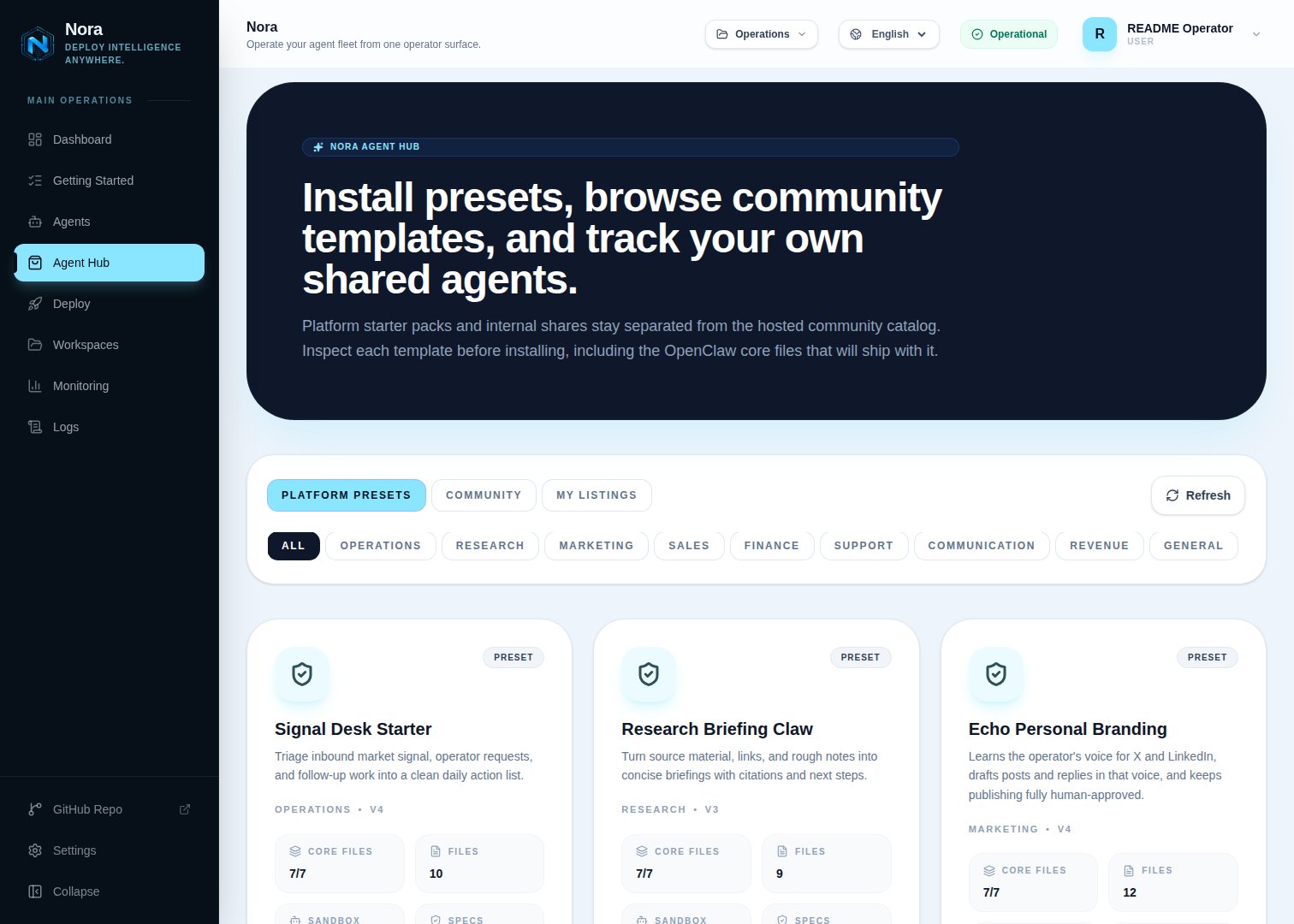
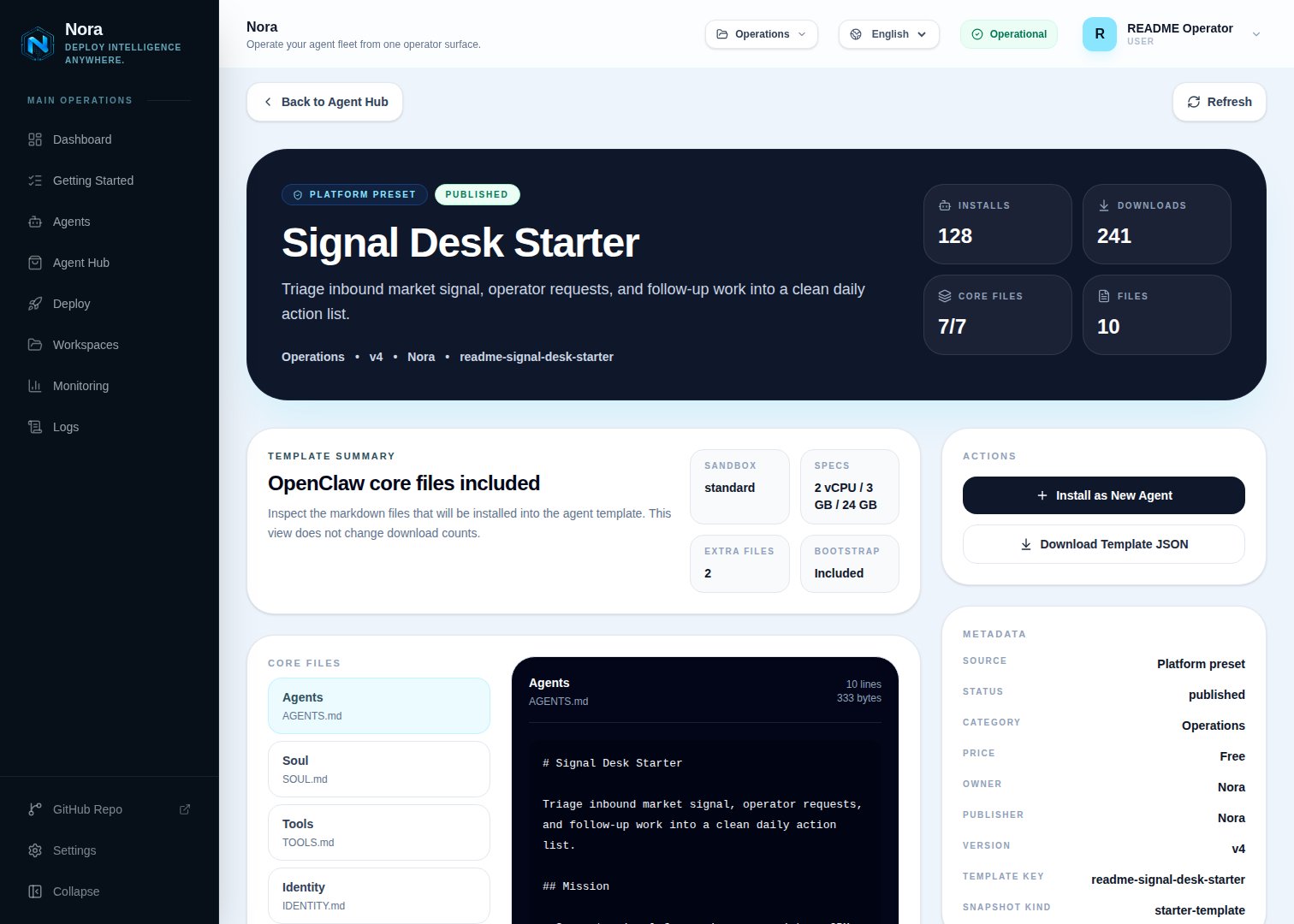
Agent Hub is Nora's template marketplace. A **listing** captures everything needed to recreate an agent — runtime family, deploy target, sandbox profile, image, environment overrides, integrations, and bootstrap files — and exposes it as a one-click install in any workspace that has access. Operators publish listings from existing agents; consumers install listings into their own workspace.
 ## Listing types
| Source type | Where it lives | Visibility |
| ----------- | ---------------------------------------------------- | ----------------------------------------- |
| Built-in | Seeded by Nora at startup | Visible to every workspace. |
| Workspace | Published by an operator from one of their agents | Visible to the publishing workspace. |
| Community | Synced from the configured upstream Agent Hub source | Visible to every workspace once approved. |
Built-in templates ship with the platform. Workspace listings are private until you also share them outward. Community listings are pulled from the upstream catalog at `NORA_AGENT_HUB_URL` (default `https://norafleet.ai`).
## Publishing by runtime family
Every listing records the `runtimeFamily` of the agent it was captured from (`openclaw` or `hermes`). Publishing is only accepted for families that are both supported and enabled on the instance (`ENABLED_RUNTIME_FAMILIES`); sharing an agent with an unknown or disabled family is rejected. The capture path differs per family:
* **OpenClaw** — the snapshot is exported through the agent runtime, falling back to the agent's stored template when the runtime is unreachable. Nora guarantees the seven required core markdown files (`AGENTS.md`, `SOUL.md`, `TOOLS.md`, `IDENTITY.md`, `USER.md`, `HEARTBEAT.md`, `MEMORY.md`) are present, synthesizing sensible defaults for any that are missing.
* **Hermes** — the snapshot is captured from the **live** agent's `/opt/data/workspace` tree over container exec, so the agent must be running when you publish. The capture excludes Nora-generated integration artifacts (the `integrations/` directory, `integrations*.json` manifests, and `NORA_INTEGRATIONS.md`), all dotfiles (for example `.env`), any file larger than 1 MB, and stops after 200 files — truncation is flagged in the bundle metadata. The bundle additionally records the agent's saved Hermes skills and its model selection (`provider`, `defaultModel`, `baseUrl` — never API keys). No OpenClaw core files are synthesized for Hermes bundles: the workspace ships exactly as captured.
Publishing runs the same secret scan for every family — listings with detected credentials are rejected before a snapshot is created.
## Installing by runtime family
The catalog shows each listing's family as a badge, and a family filter appears whenever the catalog contains both OpenClaw and Hermes listings. Installing resolves the listing's family server-side — listing field first, then the snapshot's stored defaults, then the template payload's `metadata.runtimeFamily` carrier (which survives federation through hubs that predate the family field), defaulting to `openclaw`. A request that names a different family is rejected, as is installing a listing whose family is not enabled on the instance. The install dialog constrains the deploy target and sandbox pickers to the targets enabled for the listing's family.
* **OpenClaw** — the template files (including the guaranteed core markdown set) are stored on the new agent and written into the workspace by the normal deploy bootstrap.
* **Hermes** — after the runtime is created, the deploy worker writes the bundle's files into the new agent over container exec: workspace files land under `/opt/data/workspace`, and files-mode skill directories captured under the reserved `.hermes-skills//` prefix land under `/opt/data/skills`. A marker file (`/opt/data/.nora/template-applied`) records the materialization, so redeploys whose `/opt/data` survived (Kubernetes PVCs, named volumes) never clobber files the agent has since edited; on Docker targets where `/opt/data` is rebuilt, the marker disappears with it and the bundle is re-materialized. The bundle's saved skills are seeded into the agent and reinstalled by the skills reconciler on boot, and its model selection (`provider`, `defaultModel`, `baseUrl` — keys are never bundled) is applied as the new agent's Hermes model config. Connect an LLM provider and any integrations after install, exactly as for a manually deployed Hermes agent.
If an installed agent was created from a migration draft, the migration's restored workspace wins and the bundle files are skipped for that deployment.
## Sharing model
Each workspace listing has a `shareTarget`:
| Share target | Internal workspaces | Community catalog |
| ------------ | ------------------- | ----------------- |
| `internal` | ✅ | ❌ |
| `community` | ❌ | ✅ |
| `both` | ✅ | ✅ |
Switching to `community` or `both` triggers a sync to the upstream hub. The upstream review state is mirrored back into `centralShareStatus` (`not_shared`, `queued`, `submitted`, `failed`). Reviewers in the upstream hub can request changes, and the listing's `centralError` surfaces the reason.
"Community" doesn't have to mean public. The upstream hub is whatever `NORA_AGENT_HUB_URL` points
at — the default public catalog, or an Agent Hub you self-host for your own company. Point it at
your own hub and `community`/`both` sharing becomes a private, org-internal catalog: every
operator publishes to and installs from a shared company hub without anything leaving your
infrastructure.
## Versions
A listing has one or more versions. Each version captures:
* A reference to the source agent's snapshot (image, env, files, integrations).
* A `cloneMode`: `files_only` (recommended) or `image_and_files`.
* A monotonic `versionNumber`.
When a consumer installs a listing, Nora materializes the latest version into a new agent in the consumer's workspace.
## Listing types
| Source type | Where it lives | Visibility |
| ----------- | ---------------------------------------------------- | ----------------------------------------- |
| Built-in | Seeded by Nora at startup | Visible to every workspace. |
| Workspace | Published by an operator from one of their agents | Visible to the publishing workspace. |
| Community | Synced from the configured upstream Agent Hub source | Visible to every workspace once approved. |
Built-in templates ship with the platform. Workspace listings are private until you also share them outward. Community listings are pulled from the upstream catalog at `NORA_AGENT_HUB_URL` (default `https://norafleet.ai`).
## Publishing by runtime family
Every listing records the `runtimeFamily` of the agent it was captured from (`openclaw` or `hermes`). Publishing is only accepted for families that are both supported and enabled on the instance (`ENABLED_RUNTIME_FAMILIES`); sharing an agent with an unknown or disabled family is rejected. The capture path differs per family:
* **OpenClaw** — the snapshot is exported through the agent runtime, falling back to the agent's stored template when the runtime is unreachable. Nora guarantees the seven required core markdown files (`AGENTS.md`, `SOUL.md`, `TOOLS.md`, `IDENTITY.md`, `USER.md`, `HEARTBEAT.md`, `MEMORY.md`) are present, synthesizing sensible defaults for any that are missing.
* **Hermes** — the snapshot is captured from the **live** agent's `/opt/data/workspace` tree over container exec, so the agent must be running when you publish. The capture excludes Nora-generated integration artifacts (the `integrations/` directory, `integrations*.json` manifests, and `NORA_INTEGRATIONS.md`), all dotfiles (for example `.env`), any file larger than 1 MB, and stops after 200 files — truncation is flagged in the bundle metadata. The bundle additionally records the agent's saved Hermes skills and its model selection (`provider`, `defaultModel`, `baseUrl` — never API keys). No OpenClaw core files are synthesized for Hermes bundles: the workspace ships exactly as captured.
Publishing runs the same secret scan for every family — listings with detected credentials are rejected before a snapshot is created.
## Installing by runtime family
The catalog shows each listing's family as a badge, and a family filter appears whenever the catalog contains both OpenClaw and Hermes listings. Installing resolves the listing's family server-side — listing field first, then the snapshot's stored defaults, then the template payload's `metadata.runtimeFamily` carrier (which survives federation through hubs that predate the family field), defaulting to `openclaw`. A request that names a different family is rejected, as is installing a listing whose family is not enabled on the instance. The install dialog constrains the deploy target and sandbox pickers to the targets enabled for the listing's family.
* **OpenClaw** — the template files (including the guaranteed core markdown set) are stored on the new agent and written into the workspace by the normal deploy bootstrap.
* **Hermes** — after the runtime is created, the deploy worker writes the bundle's files into the new agent over container exec: workspace files land under `/opt/data/workspace`, and files-mode skill directories captured under the reserved `.hermes-skills//` prefix land under `/opt/data/skills`. A marker file (`/opt/data/.nora/template-applied`) records the materialization, so redeploys whose `/opt/data` survived (Kubernetes PVCs, named volumes) never clobber files the agent has since edited; on Docker targets where `/opt/data` is rebuilt, the marker disappears with it and the bundle is re-materialized. The bundle's saved skills are seeded into the agent and reinstalled by the skills reconciler on boot, and its model selection (`provider`, `defaultModel`, `baseUrl` — keys are never bundled) is applied as the new agent's Hermes model config. Connect an LLM provider and any integrations after install, exactly as for a manually deployed Hermes agent.
If an installed agent was created from a migration draft, the migration's restored workspace wins and the bundle files are skipped for that deployment.
## Sharing model
Each workspace listing has a `shareTarget`:
| Share target | Internal workspaces | Community catalog |
| ------------ | ------------------- | ----------------- |
| `internal` | ✅ | ❌ |
| `community` | ❌ | ✅ |
| `both` | ✅ | ✅ |
Switching to `community` or `both` triggers a sync to the upstream hub. The upstream review state is mirrored back into `centralShareStatus` (`not_shared`, `queued`, `submitted`, `failed`). Reviewers in the upstream hub can request changes, and the listing's `centralError` surfaces the reason.
"Community" doesn't have to mean public. The upstream hub is whatever `NORA_AGENT_HUB_URL` points
at — the default public catalog, or an Agent Hub you self-host for your own company. Point it at
your own hub and `community`/`both` sharing becomes a private, org-internal catalog: every
operator publishes to and installs from a shared company hub without anything leaving your
infrastructure.
## Versions
A listing has one or more versions. Each version captures:
* A reference to the source agent's snapshot (image, env, files, integrations).
* A `cloneMode`: `files_only` (recommended) or `image_and_files`.
* A monotonic `versionNumber`.
When a consumer installs a listing, Nora materializes the latest version into a new agent in the consumer's workspace.
 ## Reports and moderation
Workspaces can report community listings for abuse or licensing concerns. Reports go through the upstream hub's moderation queue. Rejected listings are hidden from the catalog but stay visible to the publishing workspace for context.
## Permissions
Agent Hub authorization is platform-level today, not workspace-role-based:
| Capability | Who can do it |
| ----------------------------------------------- | ------------------------------------------- |
| Browse internal + community listings | Any signed-in user |
| Install a listing | Any signed-in user (subject to plan limits) |
| Publish, edit, or unpublish a listing | The owner of the source agent (and listing) |
| Moderate listings and manage Agent Hub settings | Platform admin |
Workspace-scoped RBAC for Agent Hub (viewer/editor/admin roles gating browse, install, and publish
per workspace) is on the roadmap. Until it lands, any authenticated user on the instance can
browse and install listings, and only the direct owner of an agent can publish or edit its
listing.
Agent Hub source-catalog API keys are stored hashed (HMAC with
`NORA_AGENT_HUB_API_KEY_HASH_SECRET`). Rotating the secret invalidates every issued key.
## Related
Workspace ownership and RBAC roles.
Walk through publishing and installing a listing.
## Reports and moderation
Workspaces can report community listings for abuse or licensing concerns. Reports go through the upstream hub's moderation queue. Rejected listings are hidden from the catalog but stay visible to the publishing workspace for context.
## Permissions
Agent Hub authorization is platform-level today, not workspace-role-based:
| Capability | Who can do it |
| ----------------------------------------------- | ------------------------------------------- |
| Browse internal + community listings | Any signed-in user |
| Install a listing | Any signed-in user (subject to plan limits) |
| Publish, edit, or unpublish a listing | The owner of the source agent (and listing) |
| Moderate listings and manage Agent Hub settings | Platform admin |
Workspace-scoped RBAC for Agent Hub (viewer/editor/admin roles gating browse, install, and publish
per workspace) is on the roadmap. Until it lands, any authenticated user on the instance can
browse and install listings, and only the direct owner of an agent can publish or edit its
listing.
Agent Hub source-catalog API keys are stored hashed (HMAC with
`NORA_AGENT_HUB_API_KEY_HASH_SECRET`). Rotating the secret invalidates every issued key.
## Related
Workspace ownership and RBAC roles.
Walk through publishing and installing a listing.